Your Mac is mostly build cache.

Decruft finds the DerivedData, stale simulators, Docker layers and package-manager caches your tools leave behind. You see every path, its size and its age, before anything is deleted.

Download for macOS$19 · buy a license
Free to scan. Pay only when you want to clean.Requires macOS 13 Ventura or later. Signed and notarized by Apple.
Decruft's System Data pane: 225.23 GB measured, 192.32 GB of it removable, broken down into developer tools, application support, package manager caches and the categories macOS needs.

The System Data pane on my own Mac. Every row expands to the real paths.

You didn't fill your disk. Your tools did.

Every build writes cache. Every simulator you booted once is still there. Every project you touched in 2023 still has a DerivedData folder. Nothing cleans up after itself, and macOS scatters the evidence between "System Data", "Developer" and "Mail" without telling you what any of it holds.

So you rm -rf ~/Library/Developer/Xcode/DerivedData at 2am when your build fails on a full disk, and hope you didn't just delete something that mattered.

What it cleans

Sizes measured on my own Mac, August 2026.

Finding all of it is free.Scan as often as you like, on as many Macs as you like, and see every path and size. A licence is only for removing what you find.
WHAT IT ISWHERE IT LIVESIF YOU DELETE ITSIZE
XCODE
DerivedData~/Library/Developer/Xcode/DerivedDatanext build is slow39 GB
Unused simulator runtimes~/Library/Developer/CoreSimulatorre-downloads21 GB
Device support symbols~/Library/Developer/Xcode/iOS DeviceSupportregenerates on reconnect22 GB
DEPENDENCIES
npm and pnpm stores~/.npm · ~/Library/pnpmone install to restore5.2 GB
SwiftPM and CocoaPods~/Library/Caches/org.swift.swiftpm · CocoaPodsre-resolves2.9 GB
Gradle and Cargo~/.gradle · ~/.cargorebuilds per project2.1 GB
EVERYTHING ELSE
App caches~/Library/Cachesapps regenerate them13.5 GB
Homebrew downloads~/Library/Caches/Homebrewre-downloads196 MB
iPhone backups…/MobileSync/Backupno restore point leftreview first
Source, git history, documents~/Projects · .git · ~/Documentsnever touchedrefused

Plus a System Data analyser that names every category Storage settings hides, across System Data, Developer, Mail and your apps' own folders, a duplicate finder, a large-file finder and an app uninstaller.

Nothing gets deleted without you seeing it first.

Every item shows its full path, its size, and when it was last touched. Categories that hold anything you might want back (iPhone backups, Xcode archives, local snapshots) arrive unticked. There is no button that decides for you.

Removals go to the Trash, so a mistake is one Restore away. And Decruft flatly refuses to touch your documents, Mail, Photos, keychains or another user's account, whatever you select.
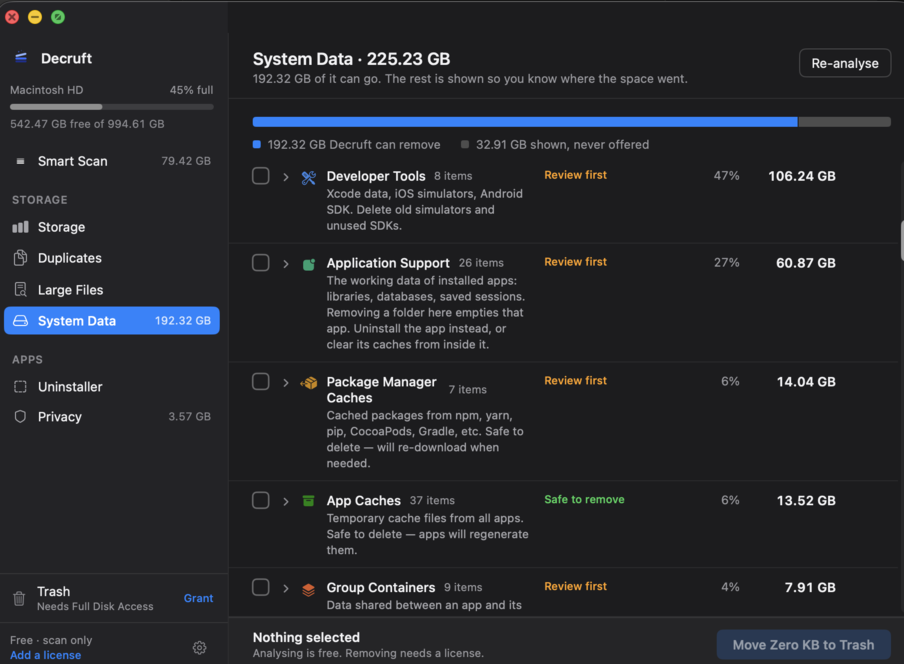
Decruft's System Data rows: Developer Tools, Application Support, Package Manager Caches and Group Containers marked Review first, App Caches marked Safe to remove, each with an explanation of what removal costs.
$19.Once.
3 MacsEvery update includedNo renewals, no upgrade fees
Buy Decruft · $19

30-day refund, no reason required.

Scanning is free forever. A licence only unlocks cleaning.

Why not a subscription?

Decruft scans and cleans entirely on your machine. Nothing about your disk is uploaded, and there is no account to create. There's no monthly cost on our side, so there's no monthly charge on yours.

The licence check is the only thing that touches the network, roughly once a week. Turn the Wi-Fi off and Decruft keeps working.

FAQ

Is this safe?

Decruft only offers caches and build artifacts your tools regenerate. Source code, git repos, documents, Mail and Photos are refused outright. Not "not selected by default". Refused. You approve every path, and removals go to the Trash.

Why does it need Full Disk Access?

Because the space is inside folders macOS keeps behind a permission prompt, like ~/Library/Developer. Cleaners that skip it report 0 KB and look broken. You grant it once, in System Settings, and you can revoke it whenever you like.

Does it work offline?

Yes. Decruft re-checks your licence about once a week, and a failed check never locks you out. It keeps working from the last successful check. Scanning and cleaning never need the network.

Can I use it on my work Mac and my personal Mac?

One licence covers 3 Macs. You can free a slot yourself from the Polar customer portal, or deactivate from inside the app under Settings → License.

What happens if you stop working on this?

Your licence keeps working. It doesn't expire, and an unreachable server never revokes it. If development stops, the last build stays yours.

What if it doesn't find much on my Mac?

Scan before you buy. That is why scanning is free. If you paid and it wasn't worth it, ask for a refund within 30 days and you'll get one, no reason required.

Does it send anything about my files anywhere?

No. Scan results never leave your Mac. The only outbound requests are the weekly licence check and the update check. No analytics, no crash reporting, no account.

What is eating the disk, folder by folder

Each guide covers one thing that fills a developer's Mac: where it lives, what recreates it, and the command to clear it. No app needed.

CoreSimulator is taking 40 GB: the devices folder, and the simctl flags that clean runtimes~/Library/Developer/CoreSimulator/Devices grows with every simulator you ever booted, and devices outlive their runtimes. Measured on one Mac: 40 GB of devices, 33 of them orphaned, 34 GB of runtime images. The commands that clear each part, with a dry run first.CleanMyMac alternative for developers: one price, no subscription, and it shows you the pathsCleanMyMac charges yearly and hides what it deletes behind a big Clean button. Decruft is $19 once, scans for free, and lists every path before anything moves. What each one does, and when CleanMyMac is still the right pick.DaisyDisk shows you the disk. It will not tell you what is safe to deleteDaisyDisk's map is the best way to see where space went. Its lowest reviews all say the same thing: it found the 200 GB of System Data and could not say what any of it was. That is the question Decruft answers.How to delete old iOS simulators and runtimes on a MacSimulator runtimes are 6 to 10 GB each and Xcode never removes the old ones. Where they live since Xcode 15, the simctl commands that remove them, and what to keep.DevCleaner vs Decruft: when the free Xcode cleaner is enough, and when it is notDevCleaner is free, open source, and cleans Xcode's six folders well. It stops at Xcode. If the rest of your disk is Docker, simulators, npm and old iPhone backups, that is where Decruft picks up.Docker.raw is 60 GB and empty. Why the file never shrinks on a Mac, and how to reclaim itDocker Desktop keeps every image and container in one sparse file that grows and never shrinks on its own. What docker system prune actually frees, and the one setting that gives the disk back.How to free up disk space on a developer's Mac: the ten folders, in order of sizeThe checklist for a Mac used for iOS, web or backend work. Each folder that fills up, where it is, what it costs to clear, and the command. Worked through on one real machine: 192 GB back.iPhone backups are taking up space on your Mac. Where they are, and which ones you can deleteEvery device you ever backed up to this Mac is still here in full. Where macOS keeps them, how to see which device each folder belongs to, and the one case where deleting loses data for good.Is it safe to delete ~/Library/Caches on a Mac? Mostly, and here is the list of what is not a cacheCaches regenerate. Some folders under ~/Library are called caches and are not. The rule for telling them apart, the folders that cost you data if you empty them, and how to clear the rest.Deleted 40 GB and the Mac still says the disk is full. Here is what is holding itThe Trash, Time Machine local snapshots and purgeable space each keep deleted files on disk for a while. How to see which one has your 40 GB, and how to release it now instead of tomorrow.Package manager caches on a Mac: npm, pnpm, yarn, pip, Gradle, Cargo, CocoaPods, and the commands that clear themEvery package manager keeps every version it ever downloaded, forever, in a hidden folder. Where each one is on macOS, how big it gets, and the one command per tool that clears it safely.Xcode is taking up 100 GB. Here is where it is, and what you can deleteXcode itself is 12 GB. The other 90 are DerivedData, old simulator runtimes, device support symbols and archives. Each folder, what recreates it, and the command to clear it.What is System Data on a Mac, and how to clear itStorage settings shows one grey bar labelled System Data and no explanation. What is inside it, folder by folder, which parts are safe to remove, which will cost you data, and the commands that clear the safe ones.
Scan first. Decide for yourself.Free to scan. Pay only when you want to clean.
Download for macOSBuy · $19